
Step 1
Enter an interest
Enter an interest or topic. Anything works: space, cooking, a video game, or your day job.
Start with what you know.
Enter a niche or topic to generate faceless channel ideas, video ideas, and content angles that can help shape a new channel concept.
Your faceless channel ideas will appear here.
Enter a niche above and press Generate.
A quick overview of what this tool helps you do.
A faceless YouTube channel ideas generator is a tool that suggests YouTube niches you can run without ever appearing on camera. You enter a topic or interest and it returns channel concepts suited to faceless formats like voiceover, screen recording, animation, or text on screen.
Quick definition first: a faceless YouTube channel is one where the creator never shows their face. The video carries the content through narration, footage, and graphics instead. History explainers, finance channels, and ambient music channels are common examples.
The generator removes the hardest first step, which is choosing what to make. Instead of guessing at niches, you get concepts built around what you already know and like.
Curious what it suggests for your interests? Enter one below and find out.
Find faceless channel concepts, video ideas, and content angles.
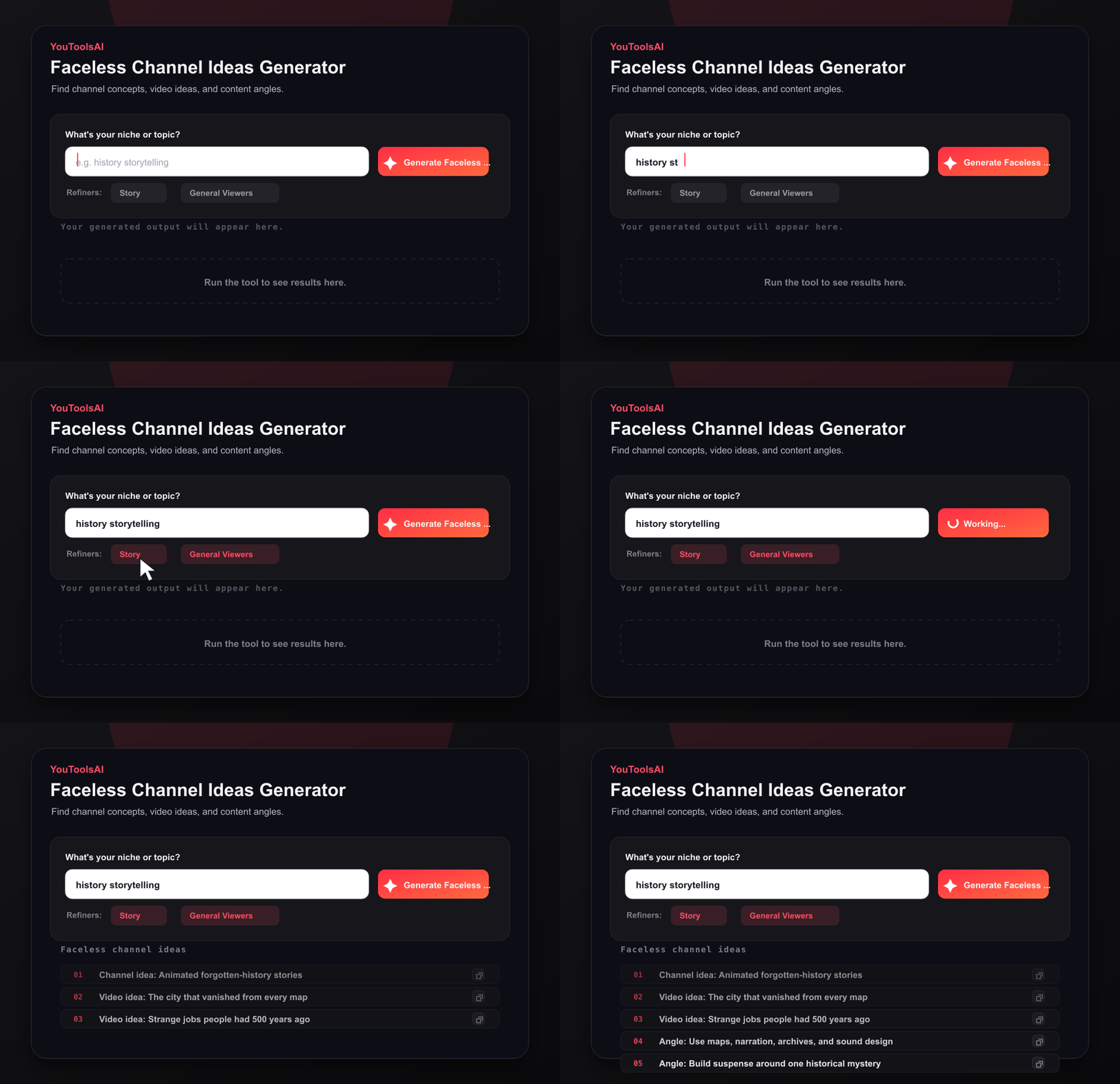
Enter an interest or topic. Anything works: space, cooking, a video game, or your day job.
Start with what you know.
Click generate, then review the faceless channel concepts built around your input.
Look for repeatable niches.
Save the ideas that fit, discard the rest, and use your strongest concept to plan the first upload.
No signup, no card, nothing to install.
Most niche lists online give everyone the same ten suggestions. This one works from your specific interest and returns concepts paired with faceless formats, so you're comparing real options instead of vague categories.
It's free, there's no account wall, and every concept you generate is yours to use however you want.
For details on how the topics you enter are handled, see the privacy policy linked in the site footer.
Common questions about AI Faceless Channel Ideas Generator.
They can be. Faceless channels earn through ads, sponsorships, and their own products, the same routes as on-camera channels. Results depend on the niche, upload consistency, and content quality rather than on showing your face, and income usually builds gradually rather than quickly.
Yes, as long as the content is original and adds value. YouTube's rules apply equally to faceless channels: simply reusing other people's work doesn't qualify. Once the channel meets YouTube's current eligibility and policy requirements, it can apply to the YouTube Partner Program.
No. Plenty of successful channels use voiceover, screen recordings, animation, or text on screen instead. What matters is engaging content in a niche people actually watch. Staying consistent and keeping the content original matter far more than being on camera.
Yes. Enter any interest and generate channel concepts at no cost, with no login and no credit card. Run it whenever your idea list runs low and keep producing fresh concepts until one feels like the channel you want to build.
Look for the overlap of three things: a topic you could cover in dozens of videos, real audience demand you've checked for yourself, and a format you can produce well without being on camera. If a niche fails any one of the three, keep looking.
Start with formats that need little editing but still add value: narrated top 10 lists over licensed footage, simple how-to guides using screen recordings, original fact explainers with narration, context, and custom visuals, or ambient music with calm scenes. Simple formats let you learn the workflow first.
Related tools
Get fresh video ideas for any niche in seconds. Enter your topic, click generate, and pick your next video from a ready-made list - free, no login.
Open toolTurn any topic into a complete YouTube video script in seconds. Enter your subject, click generate, and get a script with a hook, main points, and a closing call to action - free, with no login.
Open toolThis free YouTube title generator turns one keyword into click-worthy, search-friendly titles in seconds. Just type your topic, pick a tone, and choose your favourite.
Open toolWrite scroll-stopping video intros in seconds. This free YouTube hook generator turns your video idea into strong opening lines that keep viewers watching.
Open tool