YouToolsAI

YouTube Latest Videos Finder

Want to see a channel's newest uploads without subscribing or scrolling? Paste the link, hit Find, and get a dated list in seconds. Free, no login.

Latest uploads

Ready when you are

Paste a YouTube URL or ID above and run the tool to see results here.

What is a YouTube Latest Videos Finder?

It's a simple tool that answers one question: what has this channel posted recently?

Enter a channel link, @handle, or name, and you get the most recent public uploads listed with the newest first, each showing when it was published.

Creators use it to track competitor activity and posting rhythm. Fans use it to catch new videos without relying on notifications. Either way, it reads only the channel's public upload feed - you don't need to sign in to YouTube or provide any account access.

How to Use It

Find a channel's newest public uploads in a few quick steps.
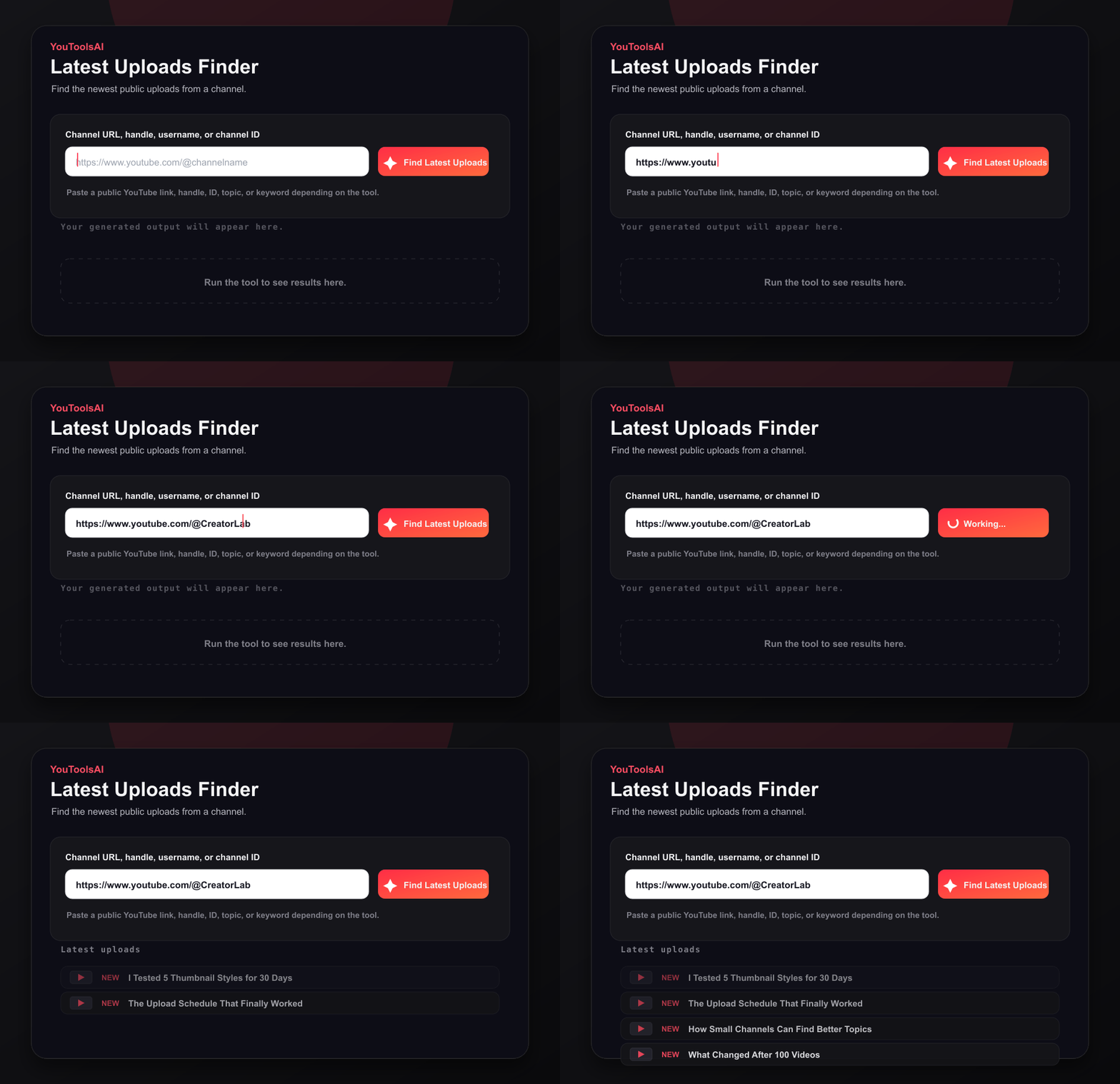
Animated demo showing a channel handle entered into the Latest Uploads Finder and recent uploads appearing.
Step 1

Copy and paste

Copy the channel link, @handle, or name, then paste it into the box at the top of this page.

Step 2

Find uploads

Click Find to load the channel's newest public uploads first, each with its published date.

Step 3

Open or check again

Open any video from the list, or reset the tool and check another channel.

One thing worth knowing: channel names are not unique. If a name matches several channels, the finder shows the closest public matches so you can pick the right one. To skip that step, paste the channel's @handle or full channel URL instead.

What You Get

  • Available public uploads displayed with the newest published items first, typically within a few seconds.
  • No sign-up required, and it is free to use.
  • Flexible input - paste a full URL, an @handle, or a channel name.
  • When metadata is available, each result includes the title, published date, and view count.
  • Works in the browser on desktop and mobile.

What It Can and Can't See

  1. 1Public uploads - this is what the tool is built for. Depending on the channel and available YouTube data, recent results may include standard videos, Shorts, premieres, or archived public livestreams.
  2. 2When a channel last posted - the top result usually shows the most recent publicly available upload and its published date, which is a useful signal of whether a channel is still active.
  3. 3Unlisted, private, and members-only videos - these generally will not appear, because they are not part of the publicly discoverable upload feed.
  4. 4Very old videos - the finder focuses on recent uploads. For a channel's all-time best performers, use a top videos finder instead.

Example Output

Gaming channel

Input: youtube.com/@GamerLena

  • Output: 3 recent uploads - "Boss Rush Challenge" (2 days ago, 48K views), "Patch 2.1 First Look" (6 days ago, 112K views), "Viewer Q&A" (11 days ago, 31K views)

News channel

Input: @DailyTechBrief

  • Output: 5 recent uploads - "Morning Markets Brief" (3 hours ago, 12K views), "Chip Shortage Update" (9 hours ago, 27K views), plus three more posted within the last 24 hours

A Few Tips

  1. 1Use the @handle when possible. Handles are unique, so they are the most reliable way to land on the exact channel you mean.
  2. 2Note the dates, not just the titles. Published dates reveal a channel's posting rhythm - weekly, daily, or fading out. That pattern is often more useful than any single video.
  3. 3Doing competitor research? Check rival channels on a regular schedule, watch which topics they publish most, and look for coverage gaps you can fill. Pair the upload list with channel stats to compare posting frequency against views and subscriber growth.
  4. 4Keep a shortlist. If you track several channels, run through them in one sitting - it is faster than opening each channel page.
  5. 5Treat notifications as a starting point, not a guarantee. YouTube alerts may be delayed, filtered, or affected by your notification settings, so checking uploads directly is a useful backup for channels you do not want to miss.

Troubleshooting

  • Make sure the URL points to a channel, not an individual video.
  • If a channel name returns multiple matches, try the full channel URL or @handle instead.
  • If a video was posted moments ago, wait briefly and check again - brand-new uploads can take a short while to appear in public data.
  • Keep in mind that scheduled videos and premieres appear only after they publish publicly.
  • If a check fails, try again shortly - temporary errors or regional restrictions can occasionally affect results.

Where the Data Comes From

The finder reads the same public upload feed you would see by visiting the channel yourself. You do not need to sign in to YouTube or grant any account access.

One small caveat: results reflect YouTube's public data at the moment you click, so a just-published video can occasionally take a short while to appear, and displayed dates depend on the metadata YouTube provides.

FAQs

Common questions about YouTube Latest Uploads Finder.

Can I see a channel's recent videos without subscribing?+

Yes. Paste the channel link or @handle and click Find. You get the newest public uploads with their published dates - no subscription, bell, or YouTube account needed.

How do I see when a channel last posted?+

Paste the channel into the finder and look at the top result. It usually shows the most recent publicly available upload and its published date - a quick way to judge whether a channel is still active.

Doesn't YouTube already notify me of new uploads?+

Not always. YouTube notifications may be delayed, filtered, or affected by your notification settings, and the home feed surfaces only some videos. Checking a channel's uploads directly removes that dependency.

What if a channel name matches several channels?+

You will get a short list of the closest public matches to pick from. Or paste the channel's @handle or full channel URL instead to identify the exact channel.

Is it free?+

Yes - free to use, with no sign-up required.

Will unlisted or members-only videos show up?+

Generally not. The finder reads the channel's publicly discoverable upload feed, and unlisted, private, and members-only videos are not normally part of it.

Related tools

Check the channel stats

See any public channel's key numbers in seconds - subscribers, total views, video count, and more. Free, no login.

Open tool

Find a channel's top videos

Paste a channel URL, handle, username, or channel ID to list top public videos sorted by views.

Open tool

See if the channel is live

Look up a channel to detect active or scheduled live streams with titles, publish times, thumbnails, and direct links.

Open tool