
Step 1
Add your topic
Type your main keyword or video topic into the input box, then choose a tone that fits your channel.
Start with one clear direction.
This YouTube title generator turns one keyword into click-worthy, search-friendly titles in seconds. Just type your topic, pick a tone, and choose your favourite. Try the YouTube title generator now - free, no signup needed.
Enter a topic or keyword phrase above to generate YouTube title ideas.
Enter a topic above and press Generate.
A YouTube title generator turns your topic or keyword into title ideas designed for real viewers, not just search engines. It helps you test clearer angles before you publish.
Use it to brainstorm titles for tutorials, reviews, Shorts, faceless videos, and educational content while keeping the final wording honest to what the video actually delivers.
Follow these simple steps to generate, review, and copy a stronger YouTube title.
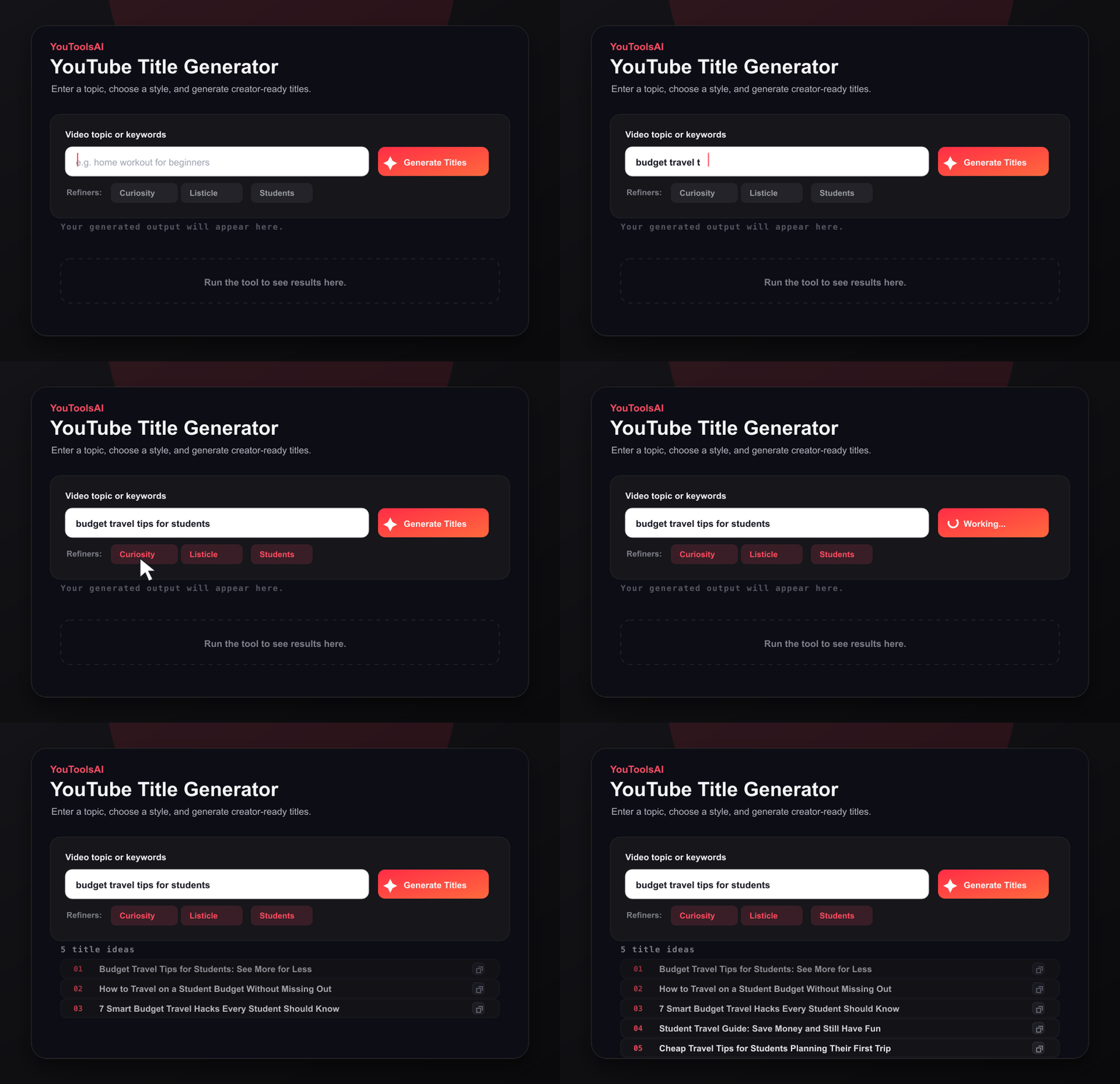
Type your main keyword or video topic into the input box, then choose a tone that fits your channel.
Start with one clear direction.
Click Generate, review the suggested titles, and pick the option that best matches your video promise.
Compare the strongest angles.
Copy the title, tweak it if needed, and paste the final version into YouTube Studio.
Use it when you publish.
That's all it takes to write a good YouTube title with AI, even on your first try. Once your title is set, you can write the rest of your listing just as fast with our YouTube description generator.
These are real-style samples of what the tool produces. Your results will match your keyword and tone.
Example 1
Input: how to save money as a student
Example 2
Input: beginner home workout no equipment
A strong title works even harder when your video is easy to find. Pair your new title with matching tags from our YouTube tag generator so search and suggested feeds understand your video.
And when the title is done, you don't have to stop there - draft your full video with our YouTube script generator and keep the whole workflow in one place.
Ready for better titles? Open the YouTube title generator and try your keyword now.
Common questions about YouTube Title Generator.
A good YouTube title is clear, honest, and gives viewers a reason to click. It usually includes your main keyword, stays under 60 characters, and hints at a real benefit or result. Curiosity and specific numbers often help increase clicks without misleading your audience.
Aim for around 50 to 60 characters. This keeps your full title visible on both desktop and mobile, where longer titles often get cut off. Shorter titles are easier to read fast, and quick readability usually leads to a higher click-through rate.
Yes. YouTube titles help the platform understand what your video is about. Adding a relevant keyword naturally in the title can improve how your video ranks in search and suggested feeds. Just avoid stuffing keywords, since clear titles perform better with real viewers.
Yes, you can generate titles for free and without logging in. Just enter your keyword, choose a tone, and get several title ideas instantly. It's a quick way to find catchy, SEO-friendly options whether you make long videos or YouTube Shorts.
Yes. Shorts titles need to be extra short and punchy, and the tool generates compact formats built for that. Keep your Shorts title under 40 characters, lead with the hook, and let curiosity do the rest - the same keyword rules still apply.
Absolutely. The tool works for tutorials, gaming, vlogs, reviews, business content, and more. Enter a keyword that matches your topic and the AI creates titles suited to your niche and tone. Stuck before the title stage? Our video idea generator can help you find the topic first.
Related tools
Create catchy, memorable, and YouTube-safe channel name ideas based on your niche, channel vibe, and target audience.
Open toolEnter a public video URL or ID to view thumbnail options across available quality levels and download them directly.
Open toolWrite scroll-stopping video intros in seconds. This free YouTube hook generator turns your video idea into strong opening lines that keep viewers watching.
Open tool