
Step 1
Enter your niche
Enter your niche or keyword. Specific helps: "meal prep for busy parents" returns sharper ideas than "food."
Start with a clear topic.
Get fresh video ideas for any niche in seconds. Enter your topic, click generate, and pick your next video from a ready-made list - free, no login.
Enter a niche or topic above to generate YouTube content ideas.
Enter a topic above and press Generate.
A YouTube video idea generator is a tool that turns your niche or keyword into a list of ready-to-plan video ideas. You enter a topic and it returns specific ideas, not vague themes, so you can pick one and start outlining today.
The point is to end the blank page problem. Instead of forcing ideas on a Sunday night, you generate a batch, keep the ones that fit your channel, and drop the rest.
It works for any niche, from cooking to coding, and it covers regular videos and Shorts.
Want to test it? Enter your niche below and generate your first batch.
Generate video ideas from a niche, topic, or audience angle.
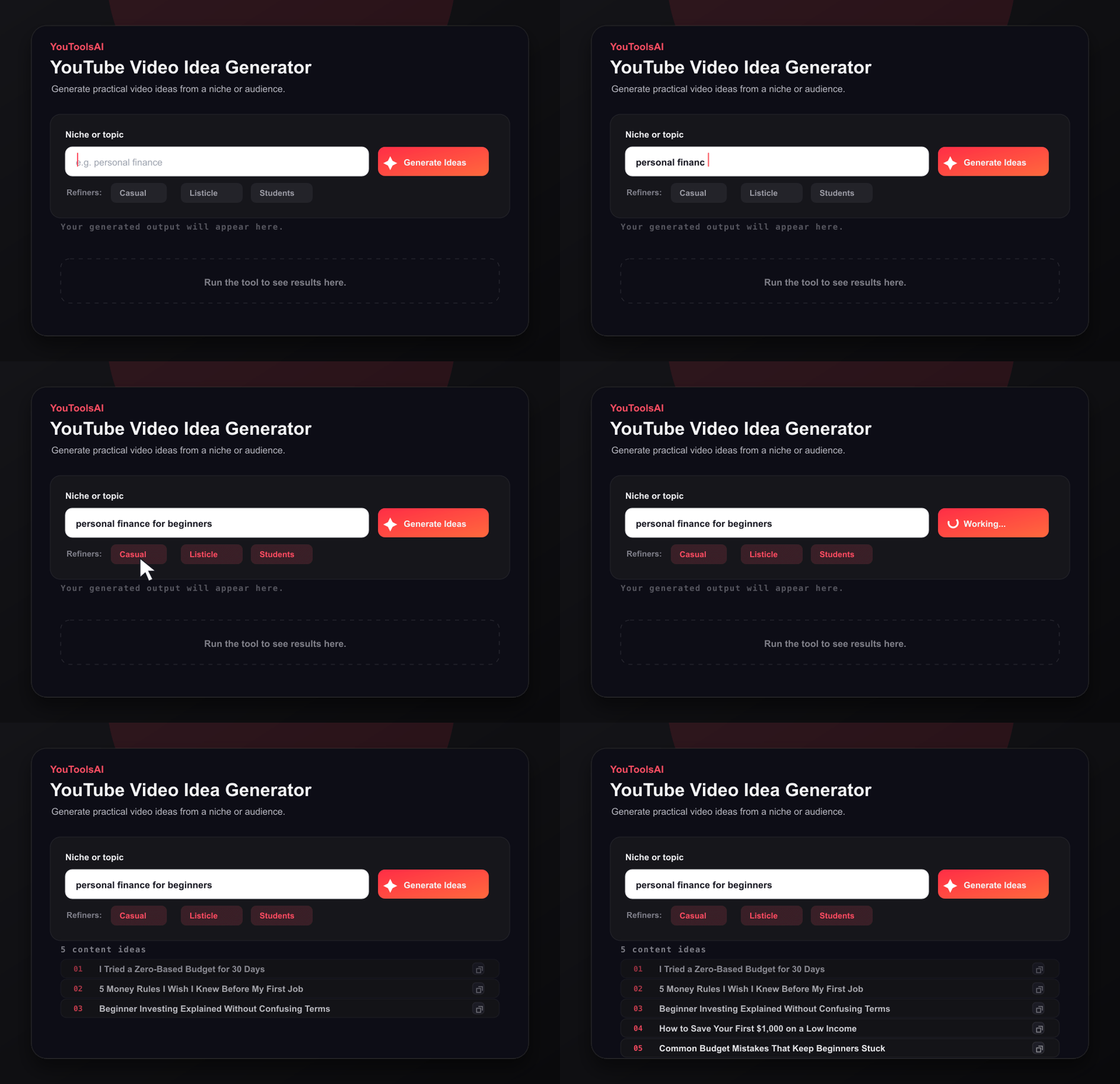
Enter your niche or keyword. Specific helps: "meal prep for busy parents" returns sharper ideas than "food."
Start with a clear topic.
Choose tone, style, and audience, then click generate to get a batch of ideas in seconds.
Shape the batch first.
Save the ideas that fit, then choose Try Another to reset the tool and explore a new topic.
No signup, no card, nothing to install.
Niche entered: "houseplant care for beginners." Here are the first eight ideas it returned, unedited:
Input: "houseplant care for beginners."
Sample output: The 5 houseplants you basically can't kill (and the one everyone buys first and regrets) Why your pothos leaves are turning yellow, and the 2 minute fix I watered my plants wrong for a year. Here's what I'd do differently Tap water vs filtered water for houseplants: does it actually matter? How to repot a root-bound plant without killing it (full walkthrough) Short: the finger test that tells you exactly when to water Short: this is what overwatering looks like vs underwatering $10 vs $50 grow light: 30 day results side by side That's the actual output. Each one is specific enough to outline immediately, and the two Shorts ideas are built for a single point delivered fast.
A lot of idea tools return the same generic prompts for every niche. This one generates from your specific keyword and gives you controls that matter in practice: tone, style, and audience.
There's no account wall and no cost, and every idea you generate is yours to use however you want.
A note on privacy: the niches and keywords you enter are used only to generate your ideas. We don't publish them, sell them, or attach them to your identity. See the privacy policy for full details.
Common questions about YouTube Video Idea Generator.
Yes. Enter any niche or keyword and generate ideas at no cost, with no login and no credit card. There's no set limit for normal use, so you can keep generating batches until your content calendar is full.
A niche helps, but it doesn't need to be perfect on day one. A clear focus makes it easier for viewers and the algorithm to understand your channel. Many creators start a little broad, watch which videos perform, and narrow down over time.
Yes. Use a focused Shorts-style input and the tool can return quick, single-point ideas built for vertical clips, like one tip, one fact, or one comparison. Shorts viewers decide in the first second or two, so each idea should hook fast.
Keep a running list and refill it before it empties. Turn comments and viewer questions into videos, follow up on your best performers with related topics, and generate a fresh batch whenever the list gets low. A system beats waiting for inspiration.
Start with simple, focused videos: a how-to that solves one common problem, a plain-language beginner guide, a short list like 5 mistakes to avoid, or a review of a tool your audience already uses. One clear idea per video is the rule.
Yes. Before generating, use the audience setting to guide the batch. A beginner-focused input returns guides and fundamentals, while an advanced audience leans toward comparisons, experiments, and deeper dives on the same keyword.
Related tools
This free YouTube title generator turns one keyword into click-worthy, search-friendly titles in seconds. Just type your topic, pick a tone, and choose your favourite.
Open toolWrite scroll-stopping video intros in seconds. This free YouTube hook generator turns your video idea into strong opening lines that keep viewers watching.
Open toolTurn any topic into a complete YouTube video script in seconds. Enter your subject, click generate, and get a script with a hook, main points, and a closing call to action - free, with no login.
Open toolType in your video title or keyword and get a complete, search-friendly description you can edit and paste into YouTube. Free, and no account needed
Open toolTurn any topic or keyword into a full set of SEO tags in seconds. Type your subject, click generate, and copy tags that help the right viewers find your video.
Open tool